Dec 28, 2025
When you hear "cloud computing," what comes to mind? For many small business owners, it sounds complex, expensive, and frankly, a bit intimidating. But what if I told you it’s really just about renting computing power, software, and storage over the internet instead of buying and maintaining it all yourself?
This simple shift allows smaller businesses to get their hands on enterprise-level tools through flexible, pay-as-you-go plans, completely changing how they operate and compete. It's not about tech for tech's sake; it's about getting better results for your business.
What Is Cloud Computing and Why Should You Care?
Let's cut through the jargon. Think of cloud computing like your office's electricity supply. You wouldn't buy and maintain a noisy, expensive generator in the back room (your own servers). Instead, you just plug into the grid and pay for what you use. That's the cloud in a nutshell: tapping into powerful computing resources delivered right over the internet.
You're already using it every day. If you use Gmail, store files in Dropbox, or stream Netflix, you're interacting with the cloud. For a small or medium-sized enterprise (SME), embracing cloud solutions is the next logical step to level the playing field. This isn't some futuristic concept; it's a practical business strategy. In fact, a 2023 Eurostat report found that 44% of SMEs in the EU were already purchasing cloud services, showing just how mainstream this has become.
The Big 'Why' for Your Business: Better ROI
The most compelling reason to care about the cloud is its direct impact on your bottom line and your ability to adapt quickly. It’s all about shifting your IT spending away from huge, upfront capital expenses (like buying servers) and towards predictable, manageable operating expenses (like a monthly subscription).
This shift brings some serious, tangible business outcomes:
Slash Upfront Costs: Forget about dropping thousands of euros on server hardware that will be obsolete in a couple of years. You can start with a small, affordable plan and simply grow as your business does. This frees up cash for marketing, hiring, or product development.
Access Powerful Tools: Get immediate access to sophisticated software for accounting, customer relationship management (CRM), and data analysis—tools that were once only within reach for large corporations.
Boost Flexibility and Scalability: Got a big marketing launch or a seasonal sales rush coming up? You can scale up your resources with a few clicks and then scale right back down. You only pay for what you need, when you need it.
Enable Secure Remote Work: Your team can securely access files, collaborate on documents, and run business applications from anywhere with an internet connection. It makes remote and hybrid work models seamless and secure.
The core benefit of the cloud is democratisation. It gives a small e-commerce startup in Brussels the same raw computing power and software capabilities as a multinational retailer, allowing them to compete on innovation and customer service, not just the size of their IT budget.
From Theory to Practice: An Actionable First Step
Let's make this real. Imagine you run a small consulting firm. Manually chasing clients for feedback via email and tracking it in spreadsheets is slow and messy. By using a cloud-based form builder like Weavely.ai, you can create and share interactive surveys to gather insights directly from your clients. The data is automatically organised and accessible from anywhere, helping you improve your services without any technical headaches.
If you're curious about how these systems are structured, exploring the fundamentals of cloud computing architecture can give you a clearer picture of the technology working behind the scenes. This foundational knowledge helps you understand how different solutions deliver these powerful benefits.
Understanding the Different Types of Cloud Services
Not all cloud solutions are the same. Just like you wouldn’t use a screwdriver to hammer a nail, you need the right type of cloud service for the right job. Getting your head around the main categories is your first step toward making a smart investment.
Let's use a simple analogy: getting a pizza. The three main service models—SaaS, PaaS, and IaaS—are like choosing between ordering a ready-made pizza, getting a meal kit, or renting a professional kitchen to make your own from scratch. Each one offers a different balance of convenience and control.
The good news? Most small businesses are already using the cloud, often without even realising it. Cloud adoption has skyrocketed. In 2023, 44% of small and medium enterprises in the EU were buying cloud services. The most popular uses were for everyday tasks like email systems (83%) and file storage (68%). You can dig deeper into these EU digitalisation trends from Eurostat.
This diagram shows how the three main service models stack up.
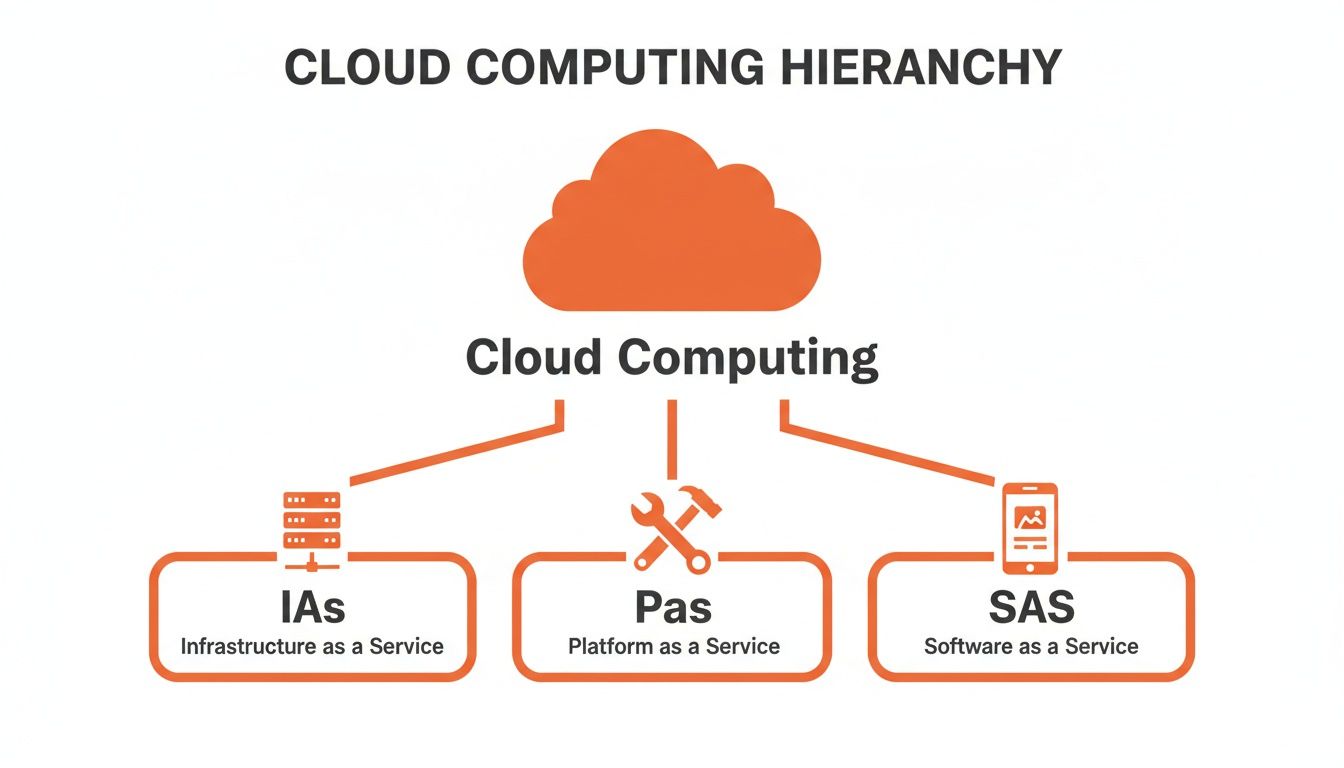
As you can see, each layer builds on the one below it. The higher you go up the stack, the more the provider manages for you, and the less you have to worry about the technical stuff.
SaaS: Software as a Service (The Ready-Made Pizza)
SaaS is like ordering a pizza that arrives hot and ready at your door. You don’t think about the ingredients, the oven, or the delivery driver—you just enjoy the meal. This is the most popular model for small businesses because it’s simple, ready to use, and requires zero technical management from you.
These are the applications you access through a web browser, usually on a subscription. The provider handles all the updates, security, and maintenance.
Real-World Example (Professional Services): A local marketing agency uses Google Workspace for email, document collaboration, and file sharing. They pay a monthly fee per user and get instant access to powerful tools without ever touching a server. They can focus on client campaigns, not IT problems.
Real-World Example (SaaS Business): A startup offering project management software uses a cloud-based CRM like HubSpot. This allows their sales team to track leads and customer interactions from anywhere, giving them a clear view of their sales pipeline and helping them close deals faster.
PaaS: Platform as a Service (The Pizza Meal Kit)
Let's go back to our pizza night. PaaS is like a meal-kit delivery. You get the dough, sauce, and toppings sent to you, but you assemble and bake the pizza in your own oven. It gives you more creative control than ordering out, but you don't have to source all the ingredients yourself.
PaaS gives developers a ready-made environment to build, test, and launch their own applications. It provides the underlying infrastructure—servers, storage, and networking—so your team can focus purely on creating great software.
Key Takeaway: PaaS is for building, not just using. It’s the perfect middle ground for businesses that need custom software but don’t want the headache of managing the entire IT stack. For example, a tech company could use a PaaS platform like Heroku to quickly deploy a new feature for their app without worrying about server configuration.
IaaS: Infrastructure as a Service (The Rented Kitchen)
Finally, IaaS is like renting a fully equipped professional kitchen. You get the ovens, countertops, and fridges, but you have to bring your own ingredients and recipes. This model offers the most control and flexibility, but it also demands the most technical know-how.
With IaaS, you’re renting the fundamental building blocks of computing—virtual servers, storage, and networking—from a provider like Amazon Web Services (AWS) or Microsoft Azure. Your IT team then builds your entire digital operation on top of that rented foundation.
E-commerce Use Case: A fast-growing online clothing shop uses IaaS to host its website. During the busy holiday season, they can instantly add more server capacity to handle the surge in traffic, ensuring the site stays fast and doesn't crash. In January, they scale back down to save money. We explore this further in our guide on how headless e-commerce leverages this flexibility.
Cloud Service Models at a Glance
To help you quickly see the differences, here’s a simple table comparing the three main cloud service models. It's a handy way to figure out which approach best fits what you're trying to achieve.
Model | What You Manage | Common Use Case | Best For |
|---|---|---|---|
SaaS | Nothing. Just use the software. | Email, CRM, accounting software | Businesses wanting ready-to-use applications with no maintenance. |
PaaS | Your applications and data. | Developing and deploying custom web or mobile apps. | Development teams who need a platform to build on without managing infrastructure. |
IaaS | Operating systems, data, applications. | Hosting websites, data storage, high-performance computing. | Companies with technical teams who need maximum control and flexibility over their infrastructure. |
Ultimately, the right choice depends on your technical resources, your budget, and how much control you need. Many businesses actually use a mix of all three.
Choosing Your Cloud Deployment Model
Now that you've got a handle on the types of cloud services, the next big question is where your business's data and apps will actually live. This is your cloud deployment model, and getting it right is a balancing act between cost, security, and control.
Think of it like your daily commute. Are you going to take the public bus, buy a private car, or maybe use a mix of both depending on where you're headed? Each choice has its pros and cons.
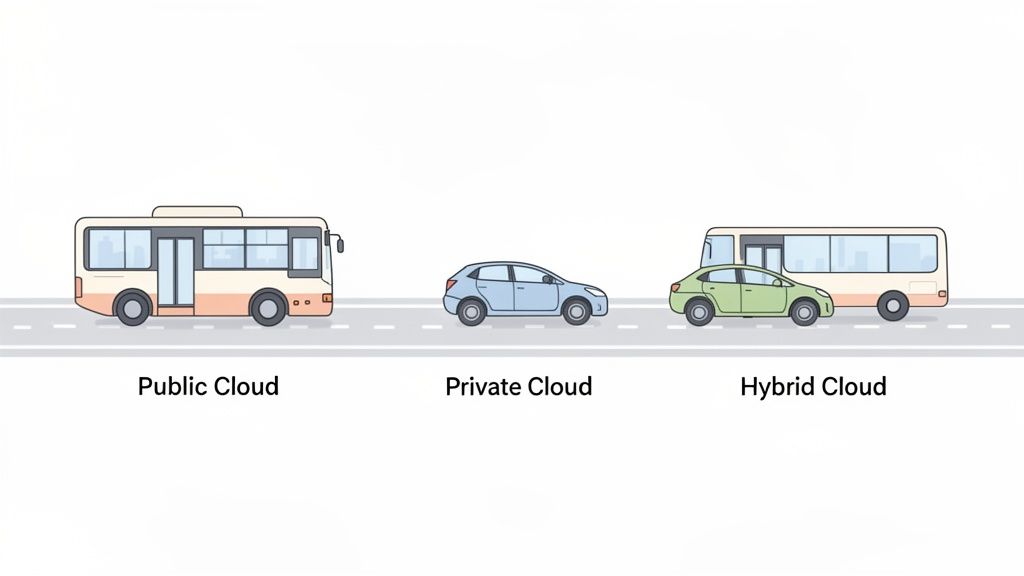
Let's break down the three main ways you can deploy to the cloud.
Public Cloud: The Cost-Effective Bus Route
The Public Cloud is like the bus of the cloud world. It's owned and run by a massive third-party provider (think Amazon Web Services or Microsoft Azure) who manages all the hardware. You're essentially sharing a huge pool of resources with lots of other businesses.
For most SMEs, this is the go-to option. It's incredibly cost-effective because you only pay for what you use, and you completely avoid the cost and headache of buying and maintaining physical servers.
Key Advantage: The low entry cost and the power to scale up or down in an instant. You get access to seriously powerful infrastructure without the eye-watering price tag.
Best For: Hosting your website, running standard business apps like your CRM, or setting up development and testing environments.
Common Objection: "Is it secure if I'm sharing?" Yes. Providers use sophisticated methods to isolate your data from other users. However, for highly sensitive data under strict regulations, you might consider other options.
Private Cloud: Your Own Personal Car
A Private Cloud is like owning your own car. The infrastructure is dedicated exclusively to your business, giving you total control over security and your data. But just like a car, it comes with the full responsibility of maintenance and upkeep.
This model can be set up in your own on-site data centre or managed for you by a third party. It offers the highest level of security and customisation.
Key Advantage: Unbeatable security and control. You know exactly where your data is and who has access—a must-have for regulations like GDPR.
Best For: Financial firms protecting client portfolios, healthcare providers securing patient records, or any business with very specific regulatory needs.
Common Objection: "This sounds expensive and complicated." It is. Building and running a private cloud demands a significant upfront investment and ongoing technical skill, which often puts it out of reach for smaller operations.
Hybrid Cloud: The Best of Both Worlds
The Hybrid Cloud is the savvy commuter who owns a car but hops on the bus for certain trips. This model blends a private cloud with one or more public cloud services, letting your data and applications move between them as needed.
This approach gives you a fantastic mix: the rock-solid security of a private cloud for your most sensitive operations and the affordable, flexible power of the public cloud for everything else.
Real-World Example (E-commerce): A Belgian e-commerce retailer might keep its customer database and financial records locked down in a private cloud to meet data privacy laws. But for its public-facing website, it uses the public cloud to easily handle the massive traffic spikes during sales, avoiding the need to buy expensive servers that would sit idle most of the year.
This mixed approach is now the dominant choice. A crucial part of your cloud journey is carefully choosing a cloud provider, where you'll weigh up factors like cost, security, and performance against the deployment model you’ve picked.
Real-World Benefits of Cloud Computing Solutions
Understanding the theory is one thing, but seeing the real-world impact is what truly matters. For small and medium-sized businesses, these benefits aren't just minor improvements; they're game-changers that directly affect your bottom line and your team's productivity.
Let's look at the tangible results you can expect when you embrace the cloud.
Slash Your IT Spending
The most immediate benefit is the dramatic cost saving. Traditionally, getting a business online meant buying expensive servers, paying for setup, and hiring someone to maintain them. This upfront capital hit can be crippling for a growing business.
Cloud computing flips this model. Instead of buying hardware, you rent it. This shifts your spending from a large, unpredictable capital expense to a manageable, predictable operating expense. A recent study found that companies can reduce their total IT costs by up to 40% by migrating to the cloud.
Key Takeaway: You stop paying for hardware that will be obsolete in a few years and start paying only for the resources you actually use. This frees up cash for what really matters—marketing, hiring, or product development.
Access Enterprise-Grade Security
Many small business owners worry that the cloud is less secure, but the opposite is often true. Major cloud providers like Amazon Web Services (AWS) and Microsoft Azure invest billions in security—far more than any SME could afford.
They employ teams of world-class security experts who work around the clock to protect your data with advanced firewalls, threat detection, and regular audits. For a small business, this is like having a dedicated cybersecurity team on your payroll for a fraction of the cost.
Example (Professional Services): A Brussels-based financial advisory firm handles sensitive client data. By using a secure cloud solution for file storage, they automatically get end-to-end encryption and multi-factor authentication, helping them meet strict GDPR requirements without needing an in-house security expert.
Future-Proof Your Business with Disaster Recovery
What would happen if a fire, flood, or even a simple power cut hit your office? For businesses relying on on-site servers, this could be a catastrophe, leading to days of downtime and lost revenue.
Cloud solutions provide robust disaster recovery by default. Your data isn't stored in one physical box; it's replicated across multiple secure data centres. If one location goes down, your systems can failover to a backup almost instantly, ensuring your business stays online. This level of resilience was once a luxury for large corporations, but the cloud makes it accessible to everyone.
Scale Your Operations Instantly
Business isn't always predictable. A successful marketing campaign could triple your website traffic overnight. With traditional servers, handling this sudden demand is impossible without buying more hardware—a slow and expensive process.
This is where the incredible scalability of the cloud shines. Need more power? You can get it with a few clicks.
E-commerce Use Case: An online gift shop in Ghent experiences a huge surge in traffic leading up to Christmas. Using a cloud-hosted e-commerce platform, they instantly scale up their server resources to handle thousands of extra visitors, ensuring their site stays fast. Once the rush is over, they simply scale back down, paying only for the extra capacity they used.
Enhance Team Collaboration and Data Insights
In today's world of remote and hybrid work, your team needs tools that let them collaborate effectively. Cloud-based platforms like Google Workspace or Microsoft 365 allow your team to co-edit documents in real-time, share files securely, and communicate seamlessly.
Professional Services Use Case: A marketing agency in Antwerp works with a network of freelance designers and writers. Using cloud-based project management tools like Asana or Trello, everyone has access to the latest project files and client feedback. This eliminates confusion and creates a single source of truth for the entire team.
On top of that, cloud solutions generate a goldmine of data. To truly understand your operations, you need to analyse this data effectively. To dig deeper, check out our guide on what is business intelligence and how it can help you make smarter decisions.
Cloud Solutions You Can Implement This Week
Theory is great, but the best way to understand cloud computing is to see it in action. You don’t need a huge IT budget or a complicated migration plan to get started. In fact, you can put some powerful, low-cost solutions to work this week that solve real business problems.
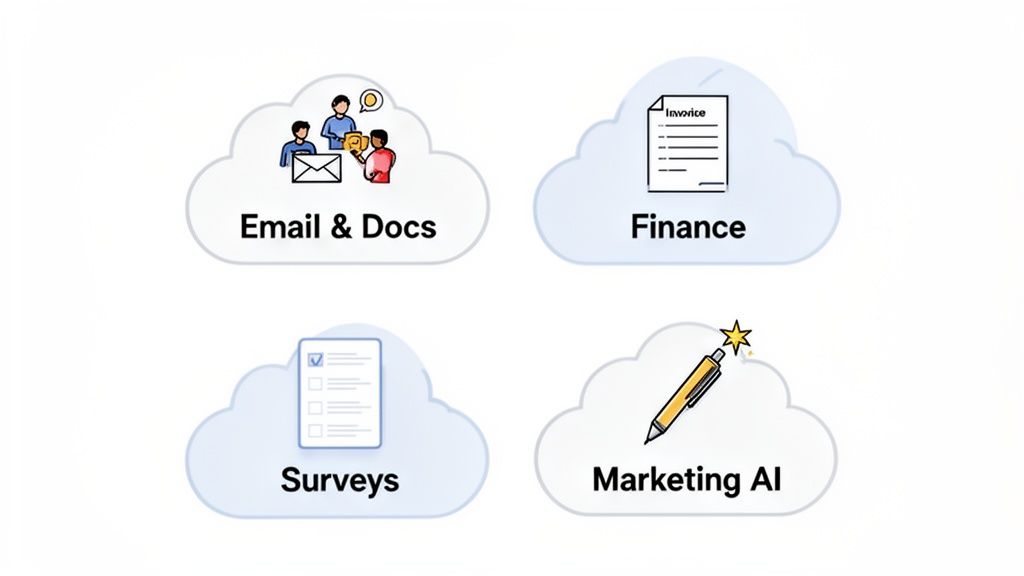
Here are four common headaches for small businesses and the straightforward cloud tools that can fix them.
1. Understand Your Customers Better
Do you know what your customers truly think? Guessing is an expensive habit. Trying to track feedback manually through emails and spreadsheets is painfully slow. A much better approach is to gather that feedback systematically.
The Problem: You need consistent customer feedback to improve your products or services but lack an efficient way to collect and analyse it.
The Cloud Solution: Use a tool like Typeform or SurveyMonkey to build custom surveys and feedback forms. You can share them with a simple link in an email or pop it straight onto your website.
The ROI: You get organised, real-time data that helps you make smarter business decisions, improve customer satisfaction, and spot new opportunities—all for a low monthly cost.
2. Boost Your Team’s Productivity
Scattered files, endless email chains, and version control nightmares can cripple a small team's efficiency. Cloud-based productivity suites solve this by creating a single, unified workspace for everyone.
The Problem: Your team wastes time searching for the right document and struggles to collaborate, especially if some people work remotely.
The Cloud Solution: Adopt a collaboration suite like Google Workspace or Microsoft 365. These platforms bundle everything—email, file storage, real-time document editing, and video conferencing—into one seamless package.
The ROI: A significant jump in productivity as your team spends less time on admin and more time on valuable work. Plus, centralised file management is a big win for security. An efficient internal system is as vital as your public-facing site; you can learn more about the impact of page load speeds on user retention.
3. Streamline Your Financial Management
Managing invoices and tracking expenses doesn't have to be so painful. Old-school desktop accounting software is often clunky and ties you to a single computer. Cloud accounting liberates your finances, making them accessible from anywhere.
The Problem: Bookkeeping is time-consuming, prone to errors, and makes it tough to get a clear, up-to-the-minute view of your company's financial health.
The Cloud Solution: Switch to a cloud accounting platform like Xero or Odoo. These tools automate tasks like invoicing and expense tracking and can link directly to your business bank account for real-time updates.
The ROI: You save hours of administrative work, slash the risk of costly errors, and gain instant visibility into your cash flow. This empowers you to make much better financial decisions on the fly.
4. Supercharge Your Marketing Efforts
Consistently creating high-quality marketing content is a massive challenge for small teams. This is where AI-powered tools, which run entirely in the cloud, can act as a powerful marketing assistant. In fact, AI running on cloud platforms has become a major driver for Belgian companies, with 72% of organisations now using Generative AI.
The Problem: You need to produce blog posts and social media updates but don't have the time or a dedicated copywriter.
The Cloud Solution: Lean on an AI content creation tool like Jasper or Copy.ai. These platforms can help you brainstorm ideas, draft copy, and even repurpose existing content in minutes, not hours.
The ROI: You can dramatically increase your content output and quality without hiring more people. This helps you attract more customers and grow your brand's online presence, far more quickly than you could on your own.
Your Simple Step-By-Step Cloud Migration Plan
Making the leap to the cloud can feel overwhelming, but the secret is to break it down into small, manageable steps. This simple roadmap will guide you from your initial idea to a fully operational cloud setup.
The key is to start with a clear "why". Don't jump on the cloud bandwagon just because everyone else is; do it because it solves a real business problem.
Step 1: Identify Your Biggest Pain Point
Before you look at any solutions cloud computing, look at your own business. What are your biggest operational headaches right now? Is your team pulling their hair out over file sharing? Does your website crash during peak times?
Jot down a list of these pain points. This isn't about getting technical; it's about identifying real-world challenges. Your goal might be as simple as "make it easier for the team to work from anywhere" or "stop wasting time on manual invoicing."
Step 2: Start Small, Get a Quick Win
You don't need to move your entire business to the cloud overnight. In fact, that's a recipe for disaster. A much smarter approach is to pick one low-risk, high-impact area for your first project. This way, you learn the ropes without causing major disruption.
Great starting points are often:
Email and Calendars: Moving from an old office server to a modern service like Google Workspace or Microsoft 365.
File Storage: Ditching local hard drives for a secure, shared platform like Dropbox or OneDrive.
Customer Surveys: Using a straightforward tool to gather customer insights without messing with your core operations.
Step 3: Choose the Right Partner
With your first project defined, it's time to find a vendor. Don't let price be your only guide. A great partner will feel less like a supplier and more like an extension of your team.
When you're weighing up providers, ask these questions:
What's your support really like? Can I speak to a human who understands my business?
How do you handle my data? Are you GDPR compliant? Where is it stored?
Is your pricing transparent? Are there hidden fees for data transfer or extra support?
Can you grow with us? How simple is it to add more users or services later on?
Step 4: Plan the Move
A little planning makes all the difference. Before you flip the switch, map out the key steps. Figure out how you're going to get your existing data across, who on the team needs to be involved, and how you'll tell everyone about the change.
Tackle any worries head-on. If your team is anxious about downtime, schedule the migration for a quiet time, like over a weekend. If data loss is the big fear, make a rock-solid backup before you start.
Step 5: Train Your Team and Go Live
Technology is only half the battle; getting people to use it is the other half. Before you launch, run a quick training session. Show your team how the new tool works, but more importantly, explain how it's going to make their day-to-day work easier.
Getting this buy-in is critical. When your team understands the "why" behind the change, they'll be far more likely to embrace it. Once everyone feels comfortable, it's time to go live and start reaping the rewards.
Got Questions About Cloud Computing?
Moving your business to the cloud is a big step, and it's natural to have questions. Let's tackle some of the most common ones we hear from business owners.
Is the Cloud Really Secure for My Business Data?
This is the number one concern for most SMEs. The truth is, major cloud providers like AWS and Microsoft Azure invest billions in security—far more than any single business could afford. Your data is often safer in their fortified, constantly-monitored data centres than on a server tucked away in your office.
They handle the heavy lifting with advanced encryption, round-the-clock threat monitoring, and automatic security updates. The key to security isn't if you use the cloud, but how you use it. It comes down to picking a reputable provider and setting up your own security settings correctly (like using strong passwords and two-factor authentication).
Will I Lose Control of My IT Operations?
This is a common myth. Moving to the cloud doesn't mean you give up control; it just changes what you’re controlling. You stop worrying about physical servers and tedious software updates. Instead, you manage your services and data through a straightforward web dashboard.
This shift frees you up to think about the bigger picture—your business goals—rather than getting bogged down in IT maintenance. You still have the final say on who accesses your data. For many, this actually provides more focused, effective control.
Is Migrating to the Cloud Expensive and Difficult?
The fear of a costly and complex project stops many business owners. While a massive migration can be complex, that's not how most businesses get started. The beauty of the cloud is its flexibility. You can start small, and you certainly don't need a huge upfront investment in hardware.
Practical Tip: Dip your toes in the water first. Start with a low-risk, high-impact project, like moving your company email over to Microsoft 365 or setting up a shared file system with Google Drive. This lets you see the benefits firsthand and learn the ropes with minimal cost and disruption. Once you're comfortable, you can tackle bigger projects with confidence.
