Jan 8, 2026
As a small business owner or entrepreneur, your website is more than just a digital storefront—it's your most dedicated employee, working 24/7 to attract customers, generate leads, and boost your bottom line. But with so many design trends and technologies, how do you create a site that actually delivers results? The truth is, the "websites best design" isn't about chasing the latest fads. It's about a smart mix of user-friendly design (UX), clear messaging, and solid performance that turns visitors into happy customers.
Think about this: a study by Stanford University found that 75% of consumers judge a company's credibility based on its website design. That means a clunky or outdated site can actively scare away business. To build a great website, you first need to understand the best practices for user interface design that keep people engaged. This knowledge is the foundation for a site that not only looks professional but works seamlessly for your audience.
This article cuts through the technical jargon. We’ll explore seven practical sources for creating a top-notch website, from high-quality templates to platforms for hiring expert agencies. We'll break down why each option works, who it’s best for, and give you actionable next steps. We'll also tackle common concerns like cost and complexity, showing you how to get a premium look without a massive budget. By the end, you'll have a clear roadmap to building a website that doesn't just look amazing but becomes a powerful engine for your company's growth.
1. Webflow Templates (Official marketplace)
For small businesses aiming for a high-end, custom look without the custom price tag, the official Webflow Templates marketplace is a fantastic place to start. It offers a curated library of professionally designed website templates built specifically for the Webflow platform. This makes it a great choice for businesses that want a beautiful, content-rich site that can be launched quickly while still offering clean code, built-in SEO controls, and the ability to grow.
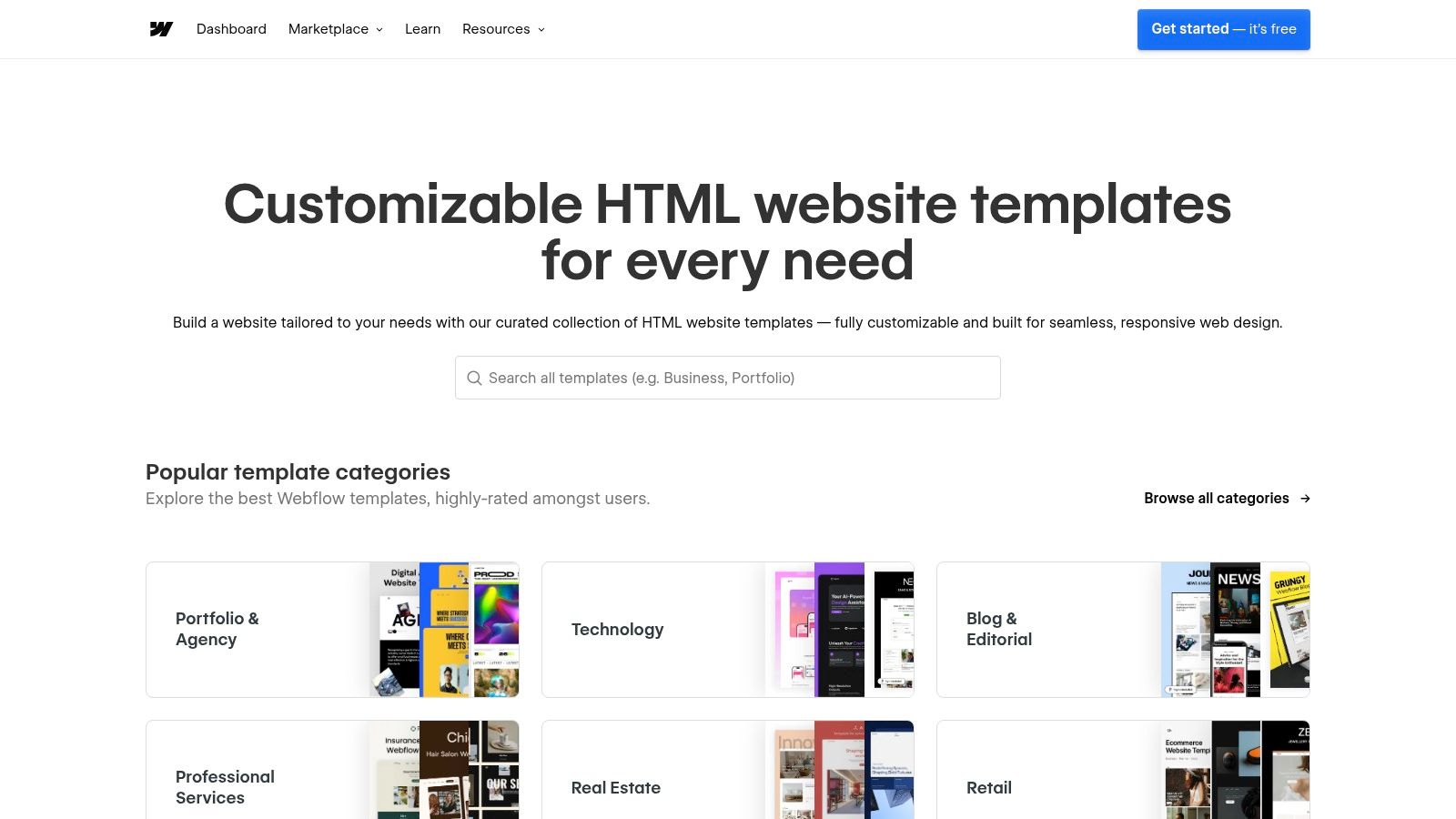
Unlike generic theme marketplaces, Webflow's templates are built directly into its visual design tool. This means what you see in the demo is exactly what you get, and customizing it feels more like using a professional design program than trying to wrestle with code. For a professional services firm, this means you can get a polished, trustworthy site live in weeks, not months, which is a huge advantage for creating some of the websites best design examples found online today.
Key Features and Why They Matter for Your ROI
Webflow’s offerings are designed for businesses that want a premium online presence that works hard for them.
Curated Quality: Every template is checked by Webflow for high design standards and mobile responsiveness. This saves you the headache of sifting through low-quality options and ensures your site looks great on any device, which directly impacts user trust and conversions.
Powerful CMS: Once you pick a template, you can connect it to Webflow's Content Management System (CMS). This makes it easy for anyone on your team to update blog posts, case studies, or team bios without needing to be a tech expert. This saves time and keeps your site fresh.
Built for Speed: Templates are built to be fast. They produce clean code, and Webflow's hosting is top-notch, leading to excellent loading speeds. Since 40% of users will abandon a site that takes more than 3 seconds to load, speed is critical for keeping potential customers.
Actionable Next Steps
Filter by Your Industry: Use the marketplace filters to find templates for your specific field (e.g., SaaS, professional services, e-commerce). This gives you a design that’s already structured for your business needs.
Test the Live Preview: Before buying, use the "Live Preview" to click through the entire template. Test it on your phone and computer. Does the navigation feel intuitive? This simple test can save you a lot of trouble later.
Map Out Your Content: A great design needs great content. Before you start customizing, outline your key pages (Home, About, Services, Contact). A well-designed template can even give you ideas for structuring your story, helping you craft the best homepage design for your business.
For those comparing different no-code tools, this in-depth comparison of Framer vs Webflow offers a detailed breakdown.
Pricing and Access
Templates are a one-time purchase, usually from $24 to $149 USD. You'll also need a Webflow site plan for hosting. This model lets you start small and upgrade as your business grows, avoiding a large upfront investment.
Visit the Website: https://webflow.com/templates
2. ThemeForest (Envato) – WordPress and multi‑CMS themes
For businesses needing a huge selection and budget-friendly options, ThemeForest is the world's largest marketplace for website themes. It has an almost endless inventory of templates, especially for WordPress, but also for Shopify and other platforms. This makes it a go-to for startups and small businesses wanting to find a very specific, niche-focused template without a big upfront cost.
Unlike curated platforms, ThemeForest’s strength is its sheer volume. You can find everything from a simple blog theme to a complex e-commerce solution. This variety allows businesses to discover websites best design patterns that are already working well in their industry. It does require a bit more homework from you, but the platform’s detailed seller ratings and customer reviews help you make a smart choice.
Key Features and Why They Matter for Your ROI
ThemeForest is all about choice, speed, and affordability.
Massive Inventory: With thousands of themes, you can find a design for almost any business. For example, a local restaurant can find a theme with built-in menu and reservation features, saving hundreds of euros in custom development.
One-Click Demo Imports: Many popular themes come with pre-built demo websites. This lets you import a complete, professional-looking site with one click, then just add your own text and images. This can cut your setup time from weeks to just a few days.
Bundled Premium Plugins: Top-selling themes often include premium tools like page builders (e.g., Elementor Pro) for free. This can save you over €100 per year in plugin costs and add powerful functionality right away.
Actionable Next Steps
Check the Reviews and Last Update: Before buying, look at the theme's ratings, read the comments to see how responsive the creator is, and check the "last updated" date. A theme that hasn't been updated in over a year could be a security risk.
Test the Live Demo on Your Phone: Open the live demo on your smartphone. Is it easy to navigate? Can you read the text easily? With over 50% of web traffic coming from mobile, this is a non-negotiable check.
Plan for Data Collection: A great website should capture leads. Think about how you'll collect customer information. You can integrate a tool like Weavely.ai to create and embed user-friendly forms directly into your new site, making it easy to gather leads or customer feedback from day one.
Pricing and Access
Themes on ThemeForest are a one-time purchase, typically from $19 to $79 USD. This usually includes six months of support. You'll need to arrange your own hosting. While the initial cost is low, be aware that you might need to pay for extended support or other plugins down the road.
Visit the Website: https://themeforest.net/category/wordpress
3. Shopify Theme Store (Official themes for Shopify)
For any business selling products online, the official Shopify Theme Store is the gold standard. It offers a carefully selected collection of free and premium themes, all designed with one goal: turning visitors into customers. These themes aren't just pretty; they are powerful, sales-focused storefronts built for speed, mobile shopping, and perfect integration with Shopify’s entire system.
Unlike other marketplaces, every theme on the Shopify store is vetted for quality. This guaranteed compatibility means you can avoid technical headaches and focus on your products. For entrepreneurs who need a reliable and scalable e-commerce platform, Shopify themes provide the foundation for some of the websites best design examples in online retail. For example, a fashion brand can use a theme with large, beautiful image galleries to showcase its clothing, leading directly to higher sales.
Key Features and Why They Matter for Your ROI
Shopify’s themes are purpose-built to increase your sales.
Vetted for Performance: Every theme is reviewed by Shopify to ensure it's fast and mobile-friendly. A one-second delay in page load time can lead to a 7% reduction in conversions, so this focus on speed directly protects your revenue.
Conversion-Focused Design: Themes come with built-in features like "quick add-to-cart," product filtering, and trust badges—all designed to make buying easier. Shopify's checkout is famously optimized, which is a key reason it powers so many successful stores.
“Try Before You Buy”: You can add any premium theme to your store, customize it with your products, and see exactly how it will look. You only pay if you decide to publish it, which removes the financial risk from your decision.
Guaranteed Updates and Support: All themes are kept up-to-date with Shopify's latest features. This ensures your store remains secure and functional, protecting your business in the long run.
Actionable Next Steps
Filter by Your Catalog Size: Use the store's filters to find themes suited for your business. A brand with five key products has different needs than a store with 500, and there's a design structured for both.
Use the "Try Theme" Feature: Add a theme to your store and spend time in the editor. Change the colors and fonts to match your brand. Look at the preview on both desktop and mobile to make sure you love it.
Optimize Your Product Pages: A great theme is just the start. Make sure your product photos are high-quality and your descriptions are persuasive. The best themes allow you to add videos and detailed specifications to help customers feel confident in their purchase.
Pricing and Access
Shopify offers excellent free themes, which are perfect for new businesses. Premium themes are a one-time purchase, usually from $180 to $350 USD. This is a lifetime license for a single store. You'll also need a monthly Shopify subscription to run your store.
Visit the Website: https://themes.shopify.com
4. Framer Templates (Official marketplace)
For startups and creative businesses that want a cutting-edge look and need to launch fast, the official Framer Templates marketplace is a goldmine. It offers a collection of premium and free templates built for Framer’s design-first platform. This makes it a fantastic choice for visually stunning landing pages, portfolios, and marketing sites that need to make a strong first impression without getting bogged down in code.

Framer's templates are deeply integrated with its powerful design tool, which feels like a mix between a design program (like Figma) and a website builder. This gives you amazing creative freedom to add cool animations and interactions. For a SaaS company launching a new product, a slick, interactive landing page built with a Framer template can significantly boost sign-ups and make the brand feel modern, helping produce some of the websites best design examples that capture today's digital trends.
Key Features and Why They Matter for Your ROI
Framer's offerings are for teams that want to go from design to a live, high-performance site in record time.
Design-First Approach: Templates are built with a modern look and feel. They use Framer's advanced styling and animation tools, letting you create memorable user experiences that help you stand out from the competition and improve brand recall.
Built-in Growth Tools: Framer is more than a design tool; it's a growth platform. Many templates work with built-in features like A/B testing and analytics, so you can start optimizing your site for conversions from day one without needing extra tools.
Simple Publishing: The platform is built for collaboration, and publishing your site is incredibly easy. This allows for quick updates and changes, letting you react to market feedback much faster than with traditional development.
Actionable Next Steps
Filter by Your Goal: Browse the marketplace and filter templates by category, such as "Landing Page," "SaaS," or "Portfolio," to find a layout that matches your specific business objective.
"Remix" to Experiment: Use the "Remix" feature to open a template directly in the Framer design tool. This lets you play with its structure and animations before you commit, ensuring it’s the right fit for your brand.
Integrate Your Tools: A beautiful website needs to generate business. Plan how you'll capture leads. You can easily embed forms from tools like Weavely.ai into your Framer pages to create custom surveys or lead generation forms that perfectly match your site's modern look.
Pricing and Access
Many templates are free, while premium ones are a one-time purchase, typically from $30 to over $150 USD. To publish your site, you'll need a Framer site plan. While this ties you to the Framer platform, its all-in-one nature makes it a great choice for visually-driven brands.
Visit the Website: https://www.framer.com/templates
5. Awwwards (Inspiration, learning, and pro directory)
For businesses that want to be on the cutting edge of digital design, Awwwards is the top global showcase for the best websites in the world. It’s more than just an inspiration gallery; it's a platform where the best digital agencies submit their work to be judged by experts. This makes it an invaluable resource for seeing what an award-winning user experience looks like today.

Unlike a simple portfolio site, Awwwards provides a curated, competitive look at what's possible. The sites featured here often push the boundaries of technology and creativity. For a small business owner, browsing Awwwards is like attending a global web design conference from your desk, giving you world-class examples of websites best design and introducing you to the talented people behind them.
Key Features and Why They Matter for Your ROI
Awwwards is designed to be both a source of inspiration and a professional networking tool.
Curated Showcase: Every "Site of the Day" has been carefully judged for its design, usability, and creativity. This high standard saves you from wading through mediocre examples and helps you quickly identify top-tier design patterns that you can adapt for your own business.
Professional Directory: The platform includes a directory of leading digital agencies and freelancers. This is a powerful tool for businesses looking to hire proven talent. The awards they've won act as a strong signal of quality and reliability.
Detailed Filtering: You can filter winning sites by industry (e.g., e-commerce, corporate), technology (e.g., Webflow, React), and even country. This lets you find highly relevant examples for your specific business needs.
Actionable Next Steps
Create an Inspiration Board: Don't just browse. As you find designs you like, take screenshots and save links. Organize them by elements you admire (e.g., "cool navigation," "great contact form") to create a clear design brief for your own project.
Analyze the 'Why': Look beyond the pretty pictures. For each winning site, ask why it works. How does the layout guide your eye? How does the design support the brand's message? Understanding these principles is key to grasping the fundamentals of UX/UI design.
Find a Partner: Use the professional directory to research potential design partners. Look at their portfolio and awards to find a studio that aligns with your company's vision and budget.
Pricing and Access
Browsing the site for inspiration is completely free. Submitting a website for an award or getting listed in the professional directory involves a fee. However, the free inspiration it provides is accessible to everyone and is an invaluable resource.
Visit the Website: https://www.awwwards.com
6. Sortlist (Belgium‑based marketplace to hire web design agencies)
For Belgian SMEs ready to invest in a custom website but not sure where to find the right agency, Sortlist is a lifesaver. This Belgian platform acts as a matchmaker, connecting businesses with a network of vetted web design agencies. It simplifies the overwhelming process of finding an agency by letting you post your project needs for free and receive a tailored short-list of qualified, local providers.

Unlike global freelance platforms, Sortlist's strength is its local focus. Working with a local agency simplifies communication and ensures they understand the local market. By pre-vetting agencies, Sortlist helps you avoid the risk of partnering with an inexperienced provider, ensuring your final website meets the websites best design standards expected in today's market and generates a real return on your investment.
Key Features and Why They Matter for Your ROI
Sortlist is built to save you time and reduce the risk of hiring the wrong partner.
AI-Assisted Matchmaking: The platform uses technology to analyze your project needs and match you with the most suitable agencies. This saves you from manually searching and contacting dozens of potential partners, freeing up your time to run your business.
Detailed Agency Profiles: Each agency on Sortlist has a profile with client reviews, budget ranges, and case studies. This transparency allows you to do your homework before you even speak to them, ensuring a better fit.
Local Focus: You can specifically search for agencies within Belgium. This ensures you find a partner who understands the local market, speaks your language, and is available for meetings if needed.
Actionable Next Steps
Create a Clear Project Brief: The more detailed your brief, the better the matches. Clearly define your goals (e.g., "increase online bookings by 20%"), your target audience, required features, and your budget.
Review the Short-list: Once you get your list of agencies, carefully review their portfolios. Look for projects they've done for businesses similar to yours. This is the best indicator of whether they can deliver what you need.
Conduct Interviews: Select your top 2-3 candidates and schedule a call. Ask them how they would approach your project and how they measure success. A great agency will be a strategic partner, key to mastering conversion-focused design and achieving real business results.
Pricing and Access
Using Sortlist to post a project and get a list of agencies is completely free for businesses. The platform makes money from the agencies. Agency project costs will vary, but profiles often provide budget indications (e.g., €5,000-€10,000) to help you find a partner in your price range.
Visit the Website: https://www.sortlist.com/web-design
7. Odoo Website (Belgium‑headquartered platform)
For Belgian SMEs looking for an all-in-one business solution, the Odoo Website builder is a smart and cost-effective choice. As a product from a Belgian company, it offers an integrated approach where your website is just the beginning. It’s perfect for businesses that need a professional site quickly and plan to add other tools—like CRM, invoicing, or e-commerce—later on, all from one unified platform.

Unlike standalone website builders, Odoo’s strength is its ecosystem. Launching your site with Odoo means you can easily add other business apps as you grow, keeping all your data connected. This solves the common headache of managing multiple, disconnected software subscriptions. For those looking for websites best design solutions that also solve business operations challenges, Odoo provides a uniquely practical and scalable option.
Key Features and Why They Matter for Your ROI
Odoo is built for business efficiency, offering powerful features even on its free plan.
Integrated Business Tools: The platform's biggest advantage is its ability to grow with you. Start with a website, then easily add a fully integrated CRM to manage your leads or an e-commerce store to sell your products. This creates a single source of truth for your business data, saving you time and reducing errors.
AI Website Generator: To get started fast, Odoo’s AI tool asks you a few questions about your business and then generates a custom website draft in minutes. This provides a solid starting point that you can then easily customize.
European Roots & GDPR Focus: Being a Belgian company, Odoo is built with European data privacy standards in mind, which is a big advantage for businesses that need to be GDPR compliant.
Actionable Next Steps
Start with the AI Generator: Use the free AI builder to create an initial design. Answer the questions about your business type and goals (e.g., generate leads, sell products) to get a tailored starting point.
Customize with Building Blocks: Odoo uses a simple drag-and-drop editor. Customize your site by adding, removing, or rearranging sections like testimonials, feature lists, and contact forms.
Plan for Your Next Step: As you build, think about what you'll need next. If lead generation is a priority, make sure your contact forms are set up to feed directly into the Odoo CRM app, which you can activate later. This forward-thinking approach maximizes the platform's value.
Pricing and Access
Odoo's "One App Free" plan is a huge draw. It lets you use the website builder and hosting for free, forever, as long as you only use that one app. This plan even includes a free custom domain name for the first year. As your business grows, you can move to a paid plan to access more apps. This is a very low-risk way for new businesses to get started online.
Visit the Website: https://www.odoo.com/app/website
Top 7 Web Design Platforms Compared
Item | Implementation Complexity 🔄 | Resource Requirements ⚡ | Expected Outcomes ⭐📊 | Ideal Use Cases 💡 | Key Advantages ⭐ |
|---|---|---|---|---|---|
Webflow Templates (Official marketplace) | Low–Medium — visual no‑code builder; CMS learning curve | Webflow account + paid site plan for CMS; one‑time template fee; optional per‑seat costs | ⭐ High — modern, performant sites with strong SEO; fast launch | Content‑rich marketing sites, portfolios, startups needing quick launches | Curated professional design; built‑in hosting & SEO; scalable within Webflow |
ThemeForest (Envato) – WordPress and multi‑CMS themes | Medium–High — setup varies by platform; may need technical tweaks | Hosting, CMS (WordPress/Shopify/etc.), theme purchase; possible premium plugins/licenses | ⭐ Variable — feature‑rich but performance/quality depend on seller | Broad project types, budget experimentation, niche templates | Largest selection; wide price range; many niche options and demos |
Shopify Theme Store (Official themes for Shopify) | Low — install and customize within Shopify | Shopify subscription; one‑time theme license per store | ⭐ High for commerce — optimized for conversions and speed; guaranteed compatibility | eCommerce stores focused on conversions and fast launch | Vetted commerce themes; commerce‑ready sections; regular updates |
Framer Templates (Official marketplace) | Low — design‑first visual editor; simple publishing | Framer account and paid plan for hosting/limits; add‑ons may increase cost | ⭐ High (visual) — striking design, fast global hosting, growth tools | Landing pages, portfolios, startups seeking strong visual presence | Modern visual language; built‑in A/B and localization; fast hosting |
Awwwards (Inspiration, learning, pro directory) | N/A — showcase and learning platform (implementation elsewhere) | Time for research/submission; pro membership or paid submissions for exposure | ⭐ High (inspiration) — benchmark best‑in‑class design and credibility | Design benchmarking, talent attraction, agency marketing and exposure | Curated award‑quality showcase; learning content and credibility signals |
Sortlist (Belgium‑based marketplace to hire web design agencies) | Low for discovery — post a brief to get shortlists; implementation via agencies | Project budget for agency fees; time to review proposals and interviews | ⭐ Medium — curated shortlists increase match quality; delivery depends on agency | Belgian SMEs seeking local agencies and compliance ease | Localized matching; saves time narrowing capable providers |
Odoo Website (Belgium‑headquartered platform) | Low–Medium — integrated website builder with AI configurator | One App Free or paid Odoo plans; possible setup for integrations and migrations | ⭐ Medium — cost‑effective integrated business stack; basic to mid design quality | Small businesses needing integrated CRM/e‑commerce/invoicing and GDPR focus | Free starter plan; seamless path to Odoo apps; European/GDPR advantages |
Your Next Step: From Inspiration to Implementation
We’ve looked at a range of powerful resources, from the flexible templates of Webflow and Framer to the huge marketplaces of ThemeForest and the sales-focused Shopify Theme Store. We've seen how platforms like Awwwards can spark new ideas, and how services like Sortlist or all-in-one platforms like Odoo can connect you with the right expertise. The key takeaway is clear: the search for the 'websites best design' isn't about finding one perfect solution. It's about finding the right tool for your specific business goals, budget, and audience.
The most successful websites are more than just pretty—they are strategic assets built on a deep understanding of the customer. They answer questions, guide visitors effortlessly towards a purchase or inquiry, and ultimately, drive real business results. This journey from a simple online brochure to a powerful sales tool begins with listening to your audience.
Turning Inspiration into a Strategic Plan
Now it's time to turn these ideas into action. The gap between a great idea and a high-performing website is bridged by a clear, simple strategy. Before you choose a platform or hire an agency, define what success looks like for your business.
Here are the critical next steps to take:
Define Your #1 Goal: What is the main purpose of your website? Is it to generate leads, sell products, or book appointments? Your answer will determine everything else. A website for a B2B consulting firm will look very different from an e-commerce store selling handcrafted goods.
Understand Your Customer: Who are you trying to reach? What problems do they have that you can solve? What information do they need to make a decision? A simple way to get these answers is to ask your existing customers. Tools like Weavely.ai let you build easy, engaging surveys to collect direct feedback on what your audience really wants.
Set a Realistic Budget: Your budget will be a key factor in deciding between a DIY template, hiring a freelancer, or partnering with an agency. Be honest about the time and money you can invest. Remember to factor in ongoing costs like hosting and maintenance.
Assess Your Tech Skills: Be realistic about your own comfort level with technology. Platforms like Shopify and Odoo are designed for beginners, while Webflow and Framer offer more creative freedom but have a steeper learning curve. Choosing a platform that matches your skills will prevent a lot of frustration.
Your Partner in Digital Growth
Navigating these choices can be tough, but you don’t have to do it alone. The difference between a website that just sits there and one that actively grows your business often comes down to expert guidance. The best website design is one that is not only beautiful but is carefully built to turn visitors into loyal customers.
At Digifox, we specialize in turning business goals into powerful digital experiences for Belgian SMEs. We help you choose the right tools and build a website that serves as the engine for your growth. We believe your website shouldn't be a cost, but a profitable investment.
If you’re ready to transform your ideas into a real, high-performing asset for your business, let's talk. Book a free, no-obligation consultation with Digifox, and let's start building your digital future, together.
